
A Teamwork alternative for studios that already run WordPress.
Client work, time tracking and approvals in the WordPress site you already host, with no per-user fee and a one-time licence.
Kanbanomy is a Teamwork alternative for agencies that run client work and bill hours. You track billable and non-billable time against estimates, show each client a clean view of their project with approvals, and keep everything in your own WordPress site. There is no per-user fee and no per-project fee, and a lifetime licence is available for Personal and Developer.
Kanbanomy has no invoicing, so you keep the tool you bill from. Export logged time to CSV and use it as the source. To move, export tasks from Teamwork as CSV and map the columns, since there is no direct Teamwork importer. Time entries and milestones are not imported. The rest of this page covers how time, clients and approvals work, and what the move costs you.
How does time tracking work for an agency?
Time is built around the hours you bill. Every entry is either billable or non-billable, and every project has a default.
Open any task and press Start timer in the Time section. A chip appears in the top strip, for example 00:42 and the task name, and it follows you around the Hub, Projects, Calendar and My Tasks. It keeps counting if you close the tab. Press Stop timer and one entry is written.
A few rules stop bad data.
- One timer per person. Starting a timer on another task stops the first one and logs its time.
- Two tabs, one entry. Pressing Stop in two tabs logs the time once.
- Forgotten timers stop at 12 hours. Kanbanomy logs 12 hours and sends a notice so you can fix it.
- The server’s clock is used. A computer with the wrong time still shows the right elapsed time.
You can also log time by hand, with hours, minutes and a note. You can remove your own entries.
How do billable and non-billable hours work?
New time follows the project’s default, which you set on the project’s Settings tab under Logged time, New time is billable. The default is on, because most agency hours are billed. Only the project owner or a manager can change it.
On any single entry you can untick Billable before you log it, or click the Billable or Non-billable chip on one of your own entries to switch it. That covers the common cases, such as a call you do not charge for inside a billable project.
Time logged before version 1.3.0 counts as billable, so existing report totals do not change after an update.
How do you compare estimated hours with logged hours?
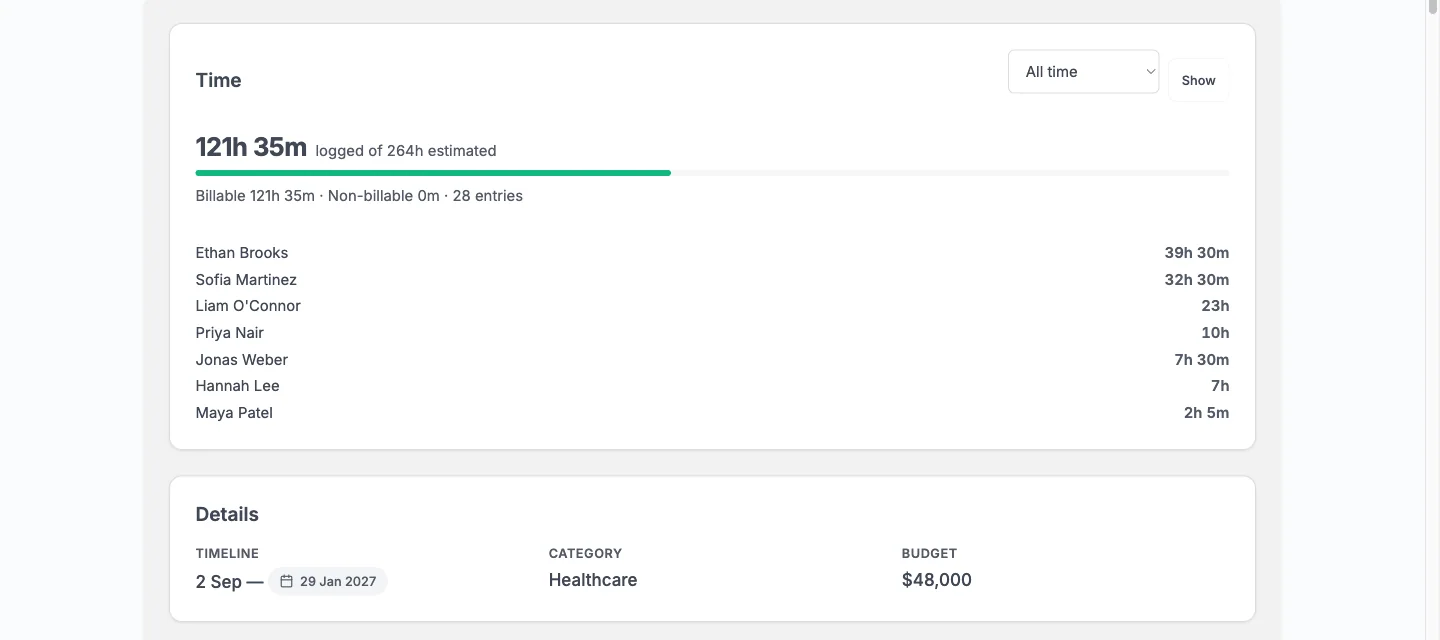
Each task can carry an estimate. The project’s Overview tab shows a Time card to team members. It compares time logged to date against the sum of the task estimates, with a bar that turns red past the estimate.
A range picker lets you view All time, This week, Last week, This month or Last month. For the range you pick, the card shows hours split into billable and non-billable, with a line per person. That is the number most agencies need at the end of the month.
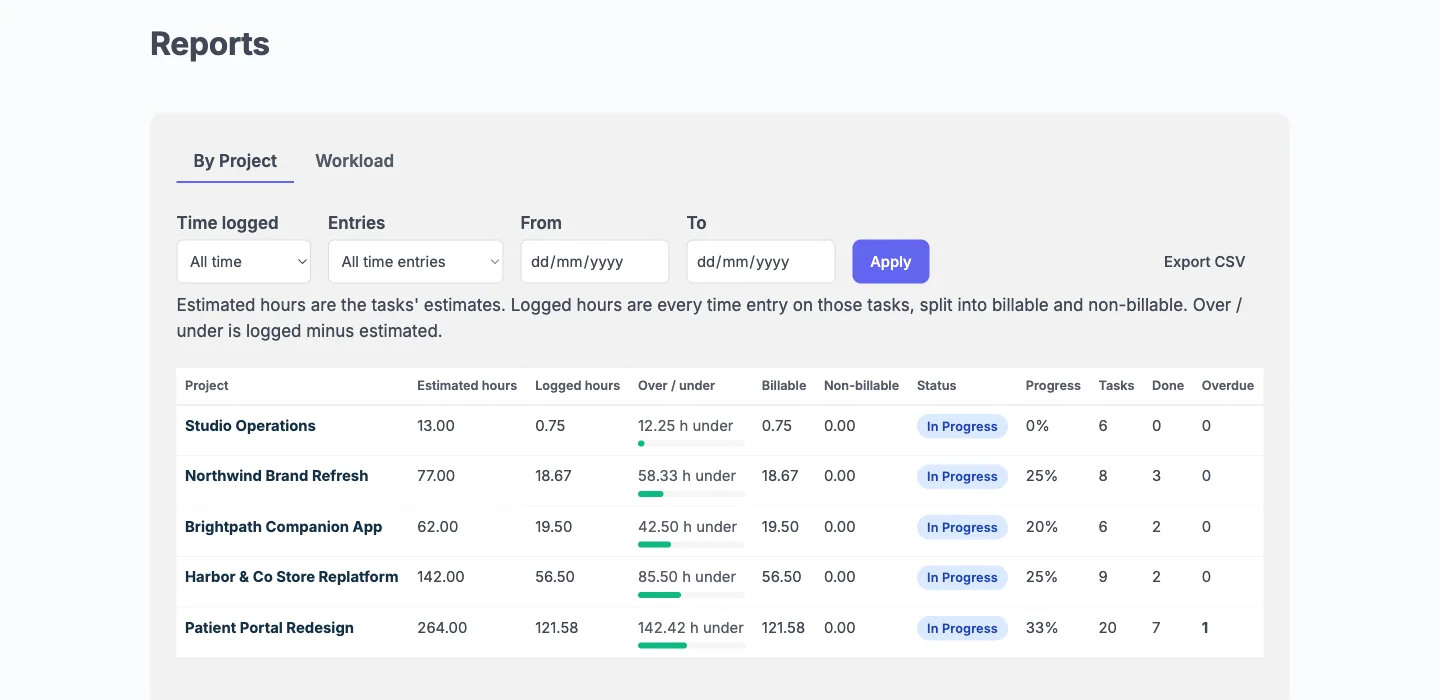
Reports in wp-admin go wider. You get logged against estimated hours by project and by person, with billable and non-billable columns, a Billable only filter and a CSV export. The Hub shows each member’s Logged This Week, and project cards show a thin bar with hours against the estimate, for your team only.
Estimates also come in through a spreadsheet. A task CSV can map an estimated hours column, so the baseline can arrive with the tasks.
What does the client see, and what stays private?
A client has the Client role and is added to a project as a Viewer. They log in, land on the Hub and never see wp-admin.
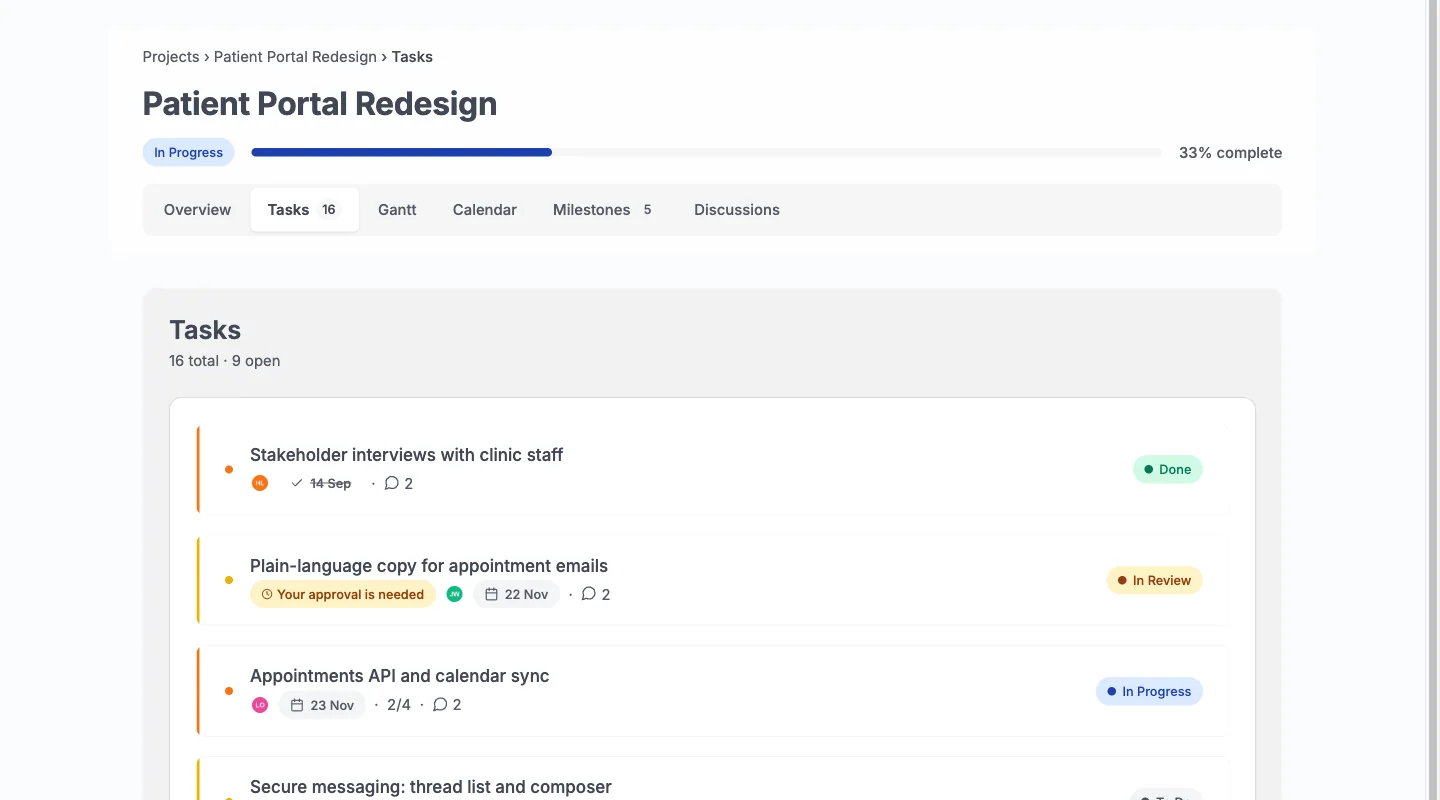
A client sees the Overview, Tasks, Gantt, Calendar, Milestones and Discussions tabs of the projects shared with them. They can comment on any task they can see, edit or delete their own comments, and answer approval requests. They cannot move or edit a task.
What stays private matters more for an agency.
- Logged time. No timer, no entry, no total.
- Internal tasks. Hidden on every screen, including counts, search, calendar feeds and emails.
- Team-only comments and discussions. A comment can be ticked Team only. A client never sees it, in the task panel, the REST API, notifications or the digest.
- Activity, watchers and the team list.
- Budget. Hidden unless you show it on a project.
A task’s Internal badge is visible to your team everywhere, so nobody has to guess what a client can see.
How do client approvals work?
Open a task and tick Needs client approval. The box appears once the project has at least one client. Every client on the project gets an email and a bell notice titled Your approval is needed, with a button to the task. The task shows a Waiting for client chip in your lists and on the Board.
The client clicks Approve, or Request changes and writes what should change. That comment is posted on the task. The person who asked gets an email and a notice, and the project activity records the answer. The task then shows Approved by or Changes requested by.
Some rules are worth knowing. Any client on the project can answer, and the first answer counts. Approving does not change the task’s status, so you move it yourself. To ask again after a revision, tick the box again, and every round stays in the activity history.
There is one limit. A client can approve or request changes on a task, but cannot request a timeline change. That is not reachable in version 1.3.0.
How does the move from Teamwork work, step by step?
There is no direct Teamwork importer, so the route is a spreadsheet.
- Install and activate Kanbanomy. There is no build step.
- Add people as users. Add your team, and add each client with the Client role.
- Create the destination project. Create the project and add the team and the client as a Viewer.
- Export tasks from Teamwork. Export them to CSV from the tool.
- Upload. Go to Kanbanomy, Import / Export, Import. Choose Spreadsheet (CSV), pick the file and click Upload and preview. The limit is 20 MB.
- Map the columns. Title is required. Map description, status, priority, start and due dates, one assignee, estimated hours and Internal.
- Import and read the results. It runs in the background and sends no emails. Check Values to check and rows that could not be read.
Undo is available for 7 days. Type UNDO in the Import log and it removes exactly what the import created.
A spreadsheet brings tasks only. Labels, checklists, comments and files do not come across, and neither do milestones or time entries. Recreate the milestones by hand, and recreate the client’s access by adding them as a user.
What does it cost to run Kanbanomy instead of Teamwork?
The licence is per site. Every feature is in every licence. There is no per-user fee and no per-project fee, so a client or a freelancer on a project does not change the price.
| Licence | Yearly | Pay once | Sites |
|---|---|---|---|
| Personal | $69 | $199 | 1 |
| Developer | $99 | $299 | 5 |
| Agency | $399 | Not offered | Unlimited |
Lifetime is available for Personal and Developer. Agency is yearly and covers unlimited sites. There is a 30 day refund.
If a yearly licence lapses, everything keeps working, and updates and support stop. Compare your current Teamwork bill on Teamwork’s pricing page, because plans change, and count the clients and contractors you pay for today.
What does a month-end hours review look like?
Here is a worked example with made-up numbers, so you can see the flow. A studio has a website project estimated at 80 hours, with the project default set to billable.
During the month, designers and developers use the timer. A client call is logged with Billable unticked, because the studio does not charge for it. On the last working day, the project manager opens the Overview tab, chooses This month on the Time card and reads two figures, billable and non-billable, with a line per person.
Next they open Reports, filter to Billable only and export the CSV. That file goes to the invoicing tool, where the invoice is made. Back in Kanbanomy, the Time card still shows all time against the 80 hour estimate, and its bar turns red if the project has run past it.
The review takes a few minutes, and nothing in it needs the client to log in. If the client asks where the hours went, you answer from your own export. Time stays with your team, so you decide how much to share and in what form.
Where does the data live?
In your own WordPress database, in 25 tables the plugin creates. The plugin sends nothing out except the licence check, which carries your key and site URL and never content.
Because you host it, you own the backups. Confirm that your backup covers the full database, since a posts-only backup misses Kanbanomy. Import and Export is not a backup. It exports projects, tasks, milestones and time entries to CSV, and imports projects and tasks only.
Kanbanomy connects to the WordPress personal data export and erase tools, so privacy requests use screens you already know. Erasure keeps shared records, such as a task, and removes the personal link.
What should you check before you move from Teamwork?
- Export your time first. Teamwork time entries will not import. Keep a CSV of the old hours and note the cut-over date.
- Decide what stays for billing. Pick the tool that creates invoices and test that logged-time CSV works as its source.
- List open projects. Move projects with live work first, and leave finished ones as an archive.
- Add users. Team members and clients need WordPress accounts.
- Set billable defaults. Decide the default per project before the first hours are logged.
- Plan for Internal. List tasks clients must not see.
- Test mail. Kanbanomy sends mail through WordPress, so use an SMTP plugin in production.
- Check cron. Recurring tasks and milestone reminders depend on scheduled jobs.
- Back up. Have a full database backup you have restored once.
Where does Teamwork still win?
Teamwork is hosted, so nobody on your team needs to think about hosting, updates or backups. If you do not run WordPress, that is a strong reason to stay.
If you create invoices from tracked time inside your project tool and want that to stay in one place, Kanbanomy will not do it. It has no invoicing, no deal pipeline and no ticketing.
Kanbanomy has no native mobile app. The responsive interface works in a phone browser, and a tapped card opens as a full-screen sheet, but a team that logs time from a phone app will notice. And your import will not carry history. Milestones and time entries start fresh.
Who should not switch from Teamwork?
Stay on Teamwork if any of these is true.
- You do not run WordPress and do not want to.
- You rely on invoicing from inside the tool.
- You need to carry years of time history into the new tool.
- You need clients to request timeline changes.
- Your team logs time mostly from a mobile app.
Kanbanomy fits agencies that already host WordPress, bill hours from a separate tool, and want clients to see progress and approve work without paying for each person.
What should you do in the first week after moving?
- Day one. Open the imported project. Check status and priority on a dozen tasks, and add milestones.
- Day two. Set the billable default on each project and add estimated hours where the import did not.
- Day three. Add a client as a Viewer, mark internal tasks and open the project as the client to check what they see.
- Day four. Ask the client to approve one task. Watch the Waiting for client chip appear on the board.
- Day five. Have the team log real time with the timer, then read the Time card for the week and export the Billable only CSV.
At the end of the week, run one real invoice from the export, and compare the hours to the old process before moving the next project. The Kanbanomy docs on time tracking cover every setting, and the client portal page shows the client side in detail.
Who moves from Teamwork.
- Agencies who want client portals without paying per collaborator.
- Studios who already run their own site and members on WordPress and want projects there too.
- Owners who prefer a licence per site to a subscription per seat.
Teamwork and Kanbanomy side by side.
| What matters | Teamwork | Kanbanomy |
|---|---|---|
| Where the data lives | On Teamwork’s servers | In your own WordPress database |
| How you pay as you grow | Per user, per month | One licence per site, no seat meter |
| Adding a client | Usually a seat, a guest slot or an upgrade | A Client role, as many as you need |
| Keeping internal work from clients | Depends on the plan and how you set it up | Internal tasks and team-only threads are built in |
| If you stop paying | Access ends | Everything keeps working, forever |
What moves across from Teamwork.
Bring tasks over by CSV
Export tasks and map them to Kanbanomy fields, with a preview and a 7-day undo.
Rebuild clients as users
Add each client as a user with the Client role and share the projects they should see.
Recreate time by hand
Time entries are not imported, so start the new hours in Kanbanomy and keep the old totals in your export.
How to move.
- In Teamwork, export your tasks to CSV.
- In WordPress, open Kanbanomy, then Import, choose Spreadsheet (CSV) and upload the file.
- Map the columns, check the preview and start the import.
Check this first.
- There is no direct Teamwork importer. CSV is the route.
- Milestones and time entries are not part of any import.
- Kanbanomy has no invoicing, so keep your billing tool.
Try it for this topic.
Open the guided demo, a client-services studio with real projects, or launch your own sandbox copy on InstaWP. Here is what to click:
- Open Import in the demo and look at what comes across and what stays behind.
- Open a project and move a card on the Board, then check the Gantt.
- Sign in as the client and compare what they see with what the manager sees.
Teamwork to Kanbanomy: questions
Can clients see the hours my team logs?
No. Time is for your team only. A client never sees a timer, a time entry or an hour total. Budget is hidden from clients too, unless you tick Client can see: Budget on a specific project.
What happens if someone forgets to stop the timer?
Kanbanomy stops any timer still running after 12 hours, logs 12 hours and sends a notice. The entry reads Auto-stopped after 12 hours, check this entry. Delete it and log the right time if you stopped earlier.
Can I get billable hours out for an invoice?
Yes. Reports show logged against estimated hours by project and by person, with billable and non-billable columns, a Billable only filter and CSV export. Use that file in your invoicing tool, since Kanbanomy does not create invoices.
Can I move my old time entries across?
No import brings time entries. Keep your old totals in your Teamwork export, start new hours in Kanbanomy, and use a date to mark where the old record ends and the new one begins.
Can I run client projects like I do in Teamwork?
Yes. Share a project with a client, keep internal tasks and team-only discussions hidden, ask for approvals, and track billable time against estimates.
Does Kanbanomy do invoicing?
No. It manages projects and time. Keep your invoicing tool and export logged time to CSV.
How many sites does a licence cover?
Personal covers one site, Developer up to five and Agency unlimited sites.
Other comparisons.
Trello alternative, Asana alternative, ClickUp alternative, Monday alternative. Or read about the client portal and self-hosted project management.
Try it with your own Teamwork board.
Self-hosted project management with no per-user fee, no per-project fee and a one-time licence. Try the demo first, then pick the licence that fits your sites.