
A monday.com alternative you own.
Visual boards and timelines for client work, on your own WordPress, with a flat licence instead of seats.
If your team lives on visual boards and timelines for client work, Kanbanomy covers that on your own WordPress site. You get a drag-and-drop Board, a Gantt timeline with dependency arrows, a calendar, a task list and a client portal. There is no per-user fee and no per-project fee. You pay once for a lifetime licence on Personal or Developer, or yearly on Agency.
monday.com has no direct importer here. You export your board to a spreadsheet, open Kanbanomy, choose Import, pick Spreadsheet (CSV) and map the columns. A preview shows what will be created before anything is. This page walks through the whole move, including what stays behind and who should not switch.
Who looks for a monday.com alternative?
Three situations come up again and again.
The first is a bill that grows with every person who needs to look at a board. When the owner, two project managers and a dozen clients all need access, the cost follows the headcount. Check the tool’s current pricing page for how your plan counts viewers, because plans change.
The second is client work. An agency wants clients to see progress without joining the team workspace and without seeing internal chatter.
The third is ownership. Some owners would rather keep the project record in their own database than in a vendor’s account.
If one of those is you, the rest of this page is useful. If none of them is, you may be better off where you are. The last sections say so plainly.
How do boards and timelines work in Kanbanomy?
Kanbanomy shows the same task data in four ways. Change a status in one view and it changes in all of them.
- Board. Drag cards between columns. Columns are yours to rename, reorder, add or remove per project. Cards show priority, assignees, labels, checklist progress and due dates.
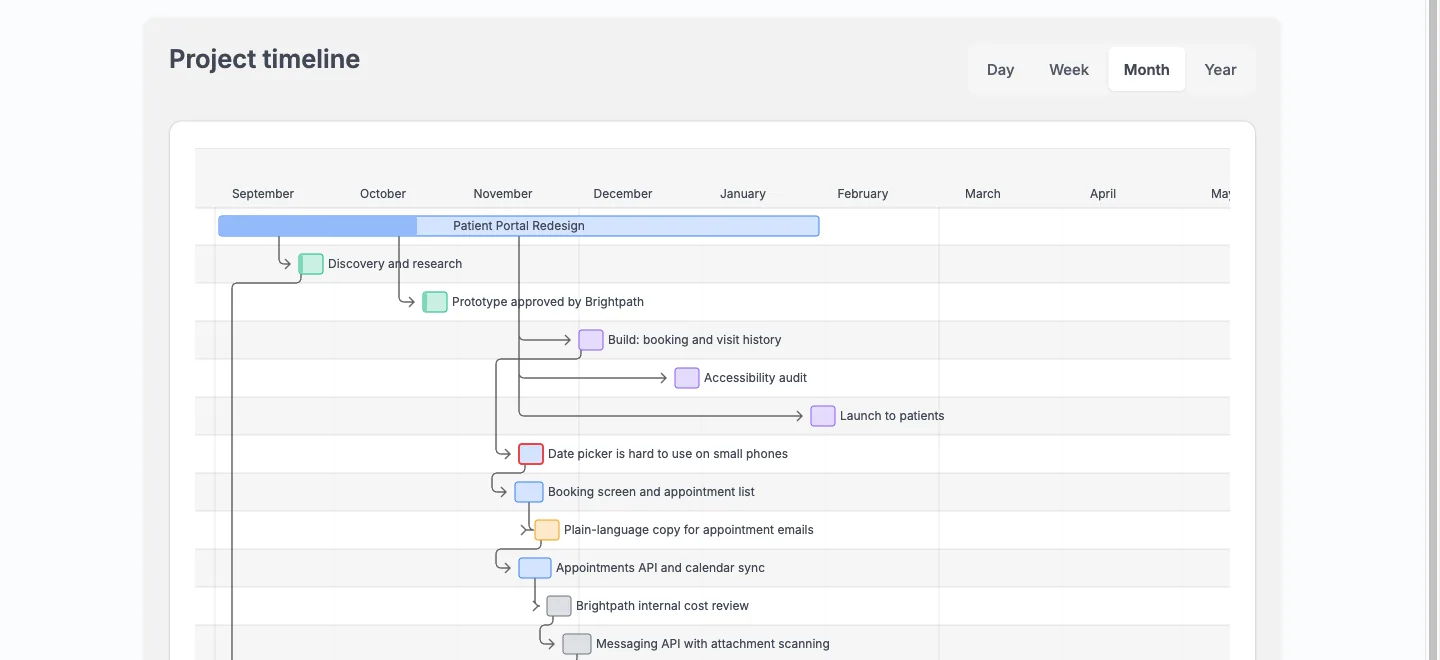
- Gantt timeline. Bars for projects, milestones and tasks, with arrows between dependent tasks. Switch between Day, Week, Month and Year.
- Calendar. Project bars, milestone markers and optional task due dates, with an .ics export for Outlook, Google Calendar and Apple Calendar.
- Task list. Cards or a sortable table, with filters and saved views you can reapply in one click.
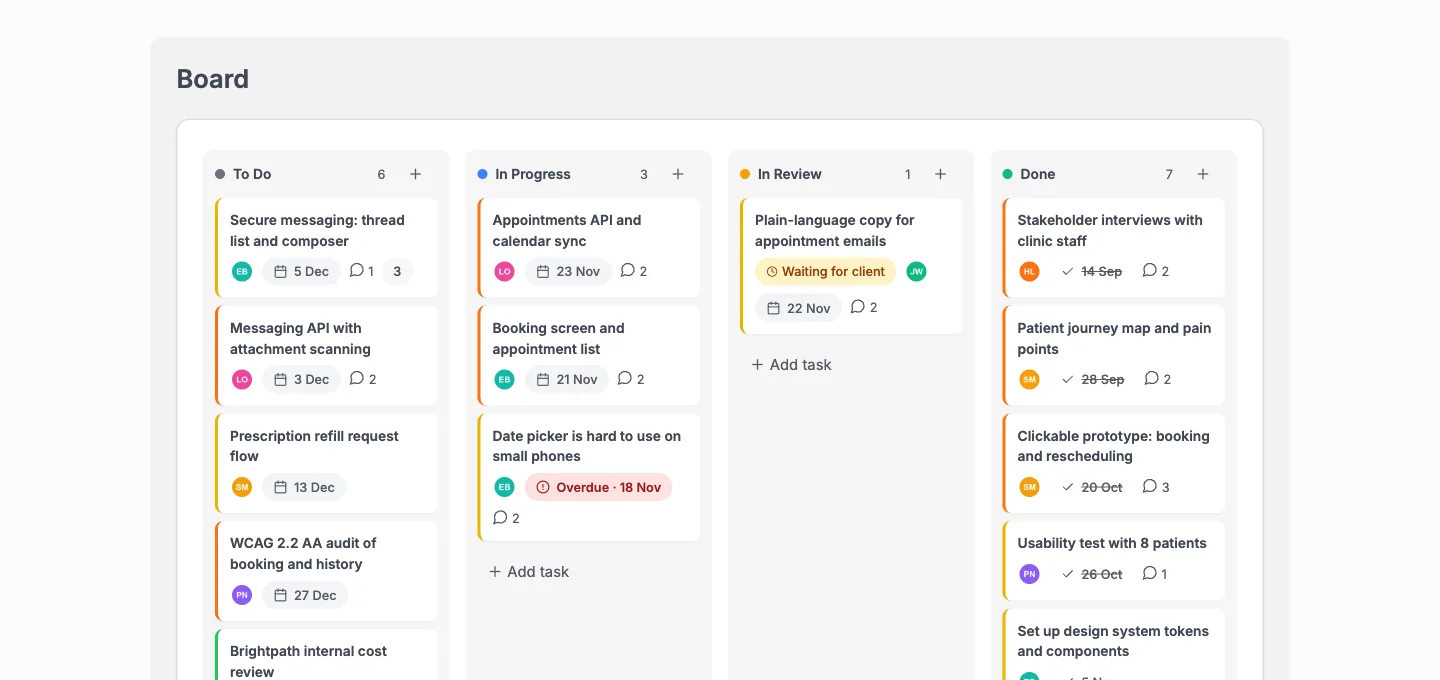
On a phone, the board shows one column with a peek of the next, and tapping a card opens the task as a full-screen sheet with a Move control. The interface is responsive. There is no native mobile app.
Each task can hold several assignees, watchers, start and due dates, labels, subtasks, dependencies, checklists, comments with @mentions, time entries, custom fields and file attachments. A task can also repeat daily, weekly, biweekly, monthly or quarterly.
How do clients follow work without a seat?
A client gets one email with one link. If they have no account yet, Kanbanomy creates one with the Client role, they choose a password and land on their Hub. They never enter wp-admin.
Inside a shared project, a client sees the Overview, Tasks, Gantt, Calendar, Milestones and Discussions tabs. They can comment on tasks and approve work when you ask. They never see tasks you mark Internal, team-only comments and discussions, the activity log, the team list or logged time. The budget stays hidden unless you switch it on for that project.
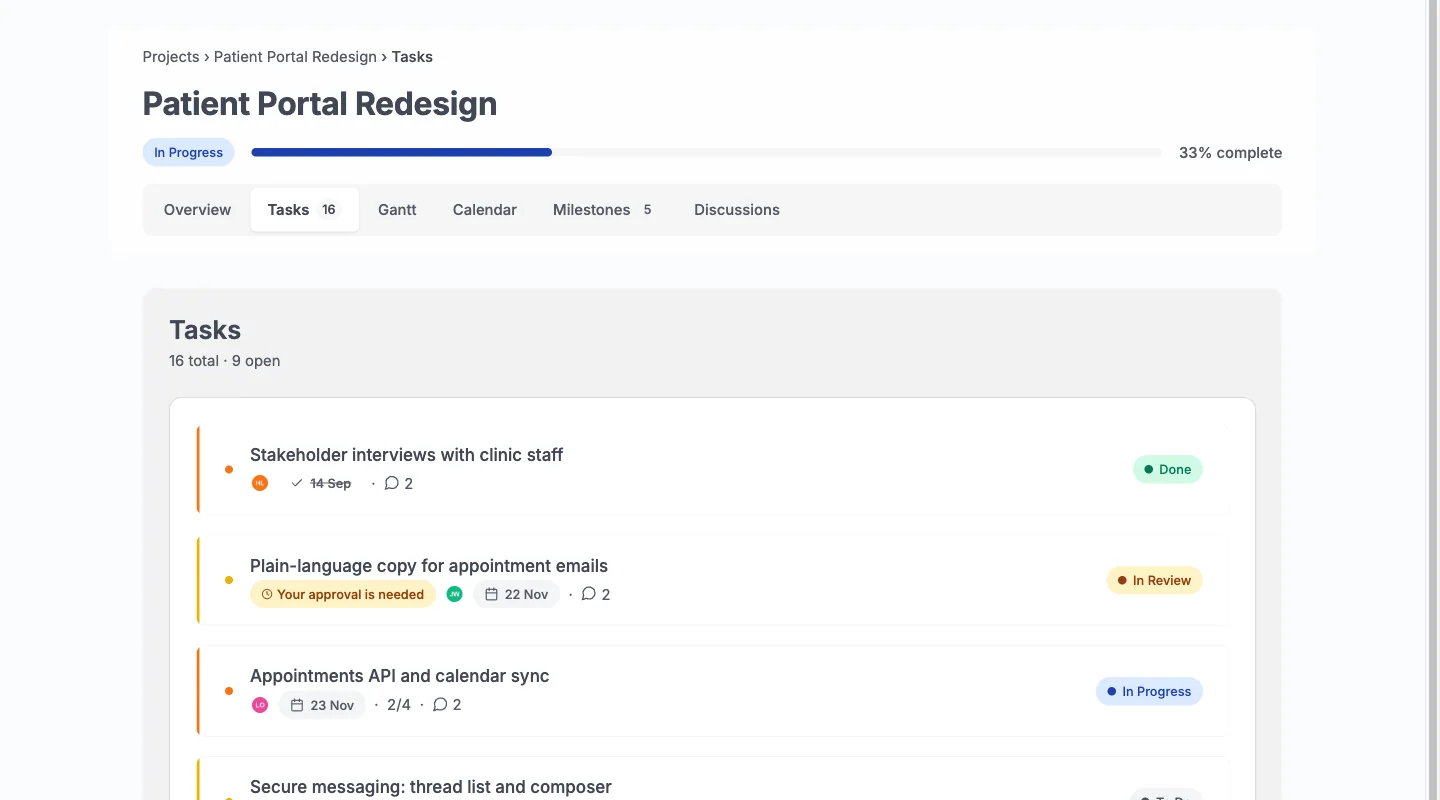
Because there is no per-user fee, adding the tenth client costs the same as adding the first. Pricing is per site. The client portal page covers the full set of rules, and the demo lets you log in as a client and check for yourself.
One limit to know. Clients cannot request timeline changes in 1.3.0. They can comment and approve, and your team moves the dates.
What does it cost to run?
Kanbanomy is priced per site, and every feature is in every licence.
| Licence | Yearly | Pay once (lifetime) | Sites |
|---|---|---|---|
| Personal | $69 | $199 | 1 |
| Developer | $99 | $299 | 5 |
| Agency | $399 | Not offered | Unlimited |
There is no per-user fee and no per-project fee. Personal and Developer can be bought once and kept. Agency is yearly only. A refund is available for 30 days.
If a licence lapses, the plugin and all its features keep working. You stop receiving updates and support. For the monday.com side of the comparison, check the tool’s current pricing page and count how many people would need access. See pricing for the details on this side.
Your own costs are hosting, backups and email delivery. A site that already runs WordPress usually has all three.
Where does the data live?
In your own WordPress database. Kanbanomy creates 25 tables of its own, and your backup needs to cover the full database, not only posts. No project data is sent anywhere. The only outbound request the plugin makes is the licence check, which sends the key and the site URL and never your content.
Deleting the plugin keeps your data by default. Erasing it takes a deliberate setting you change beforehand. The plugin is also connected to the WordPress personal data export and erase tools, which helps when a client asks for their data.
Kanbanomy needs WordPress 7.0 or newer and PHP 8.1 to 8.5. It was tested on a seeded site with 10,000 users, 2,007 projects and 100,023 tasks. On that site a project with 5,000 tasks answered in 80 to 90 ms of server time. Your host sets the real numbers.
How do I move monday.com boards over with a CSV?
There is no direct monday.com importer, so the spreadsheet is the route. You need administrator or Project Manager access in WordPress.
- In monday.com, export the board to a spreadsheet from the tool’s export menu.
- In WordPress, create a project in Kanbanomy for the board. Tasks go into a project that already exists.
- Add your team to the project first, so assignees can be matched.
- Open Kanbanomy > Import / Export > Import.
- Under Where is your work now? choose Spreadsheet (CSV).
- Pick the Migration preset for Monday.com exports if you want the columns pre-mapped, and choose the file. A CSV file can be up to 20 MB.
- Click Upload and preview, check the column mapping and click Import Tasks.
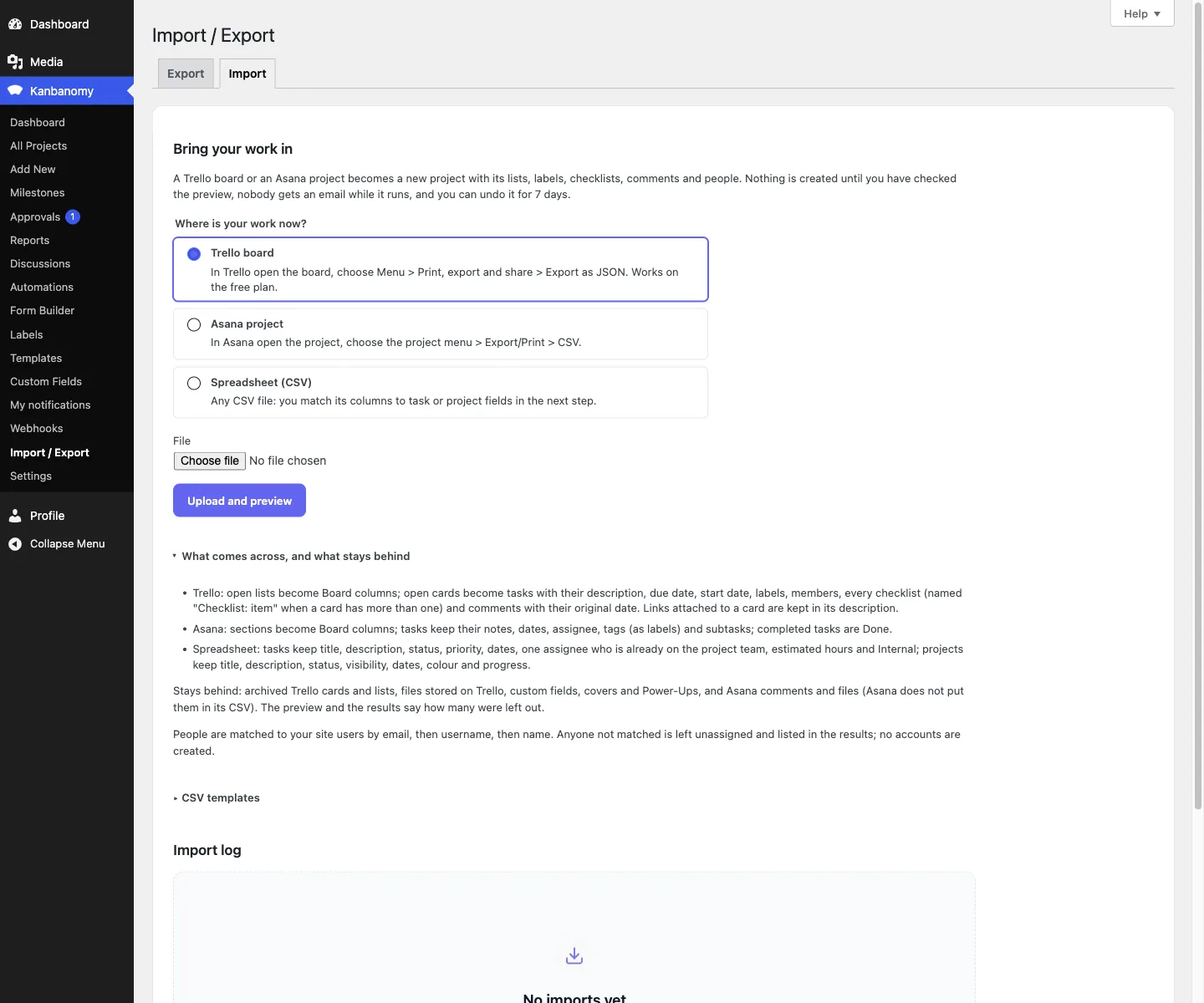
The import runs in the background with a progress bar. Nobody receives an email while it runs. You get one notification when it finishes, and the results list what was created and what needs a look.
The full CSV guide covers every field and a worked example.
How does column mapping work?
Kanbanomy shows each column of your file with a drop-down for the field it fills, plus the first rows as a sample. Title is the only required field. Choose Skip for anything you do not want.
| Your spreadsheet column | Kanbanomy field | Notes |
|---|---|---|
| Item or task name | Title | Required |
| Status | Status | Mapped to a Board column; unknown words become To Do |
| Priority | Priority | Unknown words become Medium |
| Person | Assignee | One person, already on the project team |
| Timeline start and end | Start Date, Due Date | Read in your site’s date format |
| Notes | Description | Plain text |
| Estimate | Estimated hours | Number |
| Anything private | Internal flag | yes, true, 1 or internal hides it from clients |
Kanbanomy reads common status words from other tools, such as Backlog, Working on it, Stuck, Needs review, Done and Complete. Anything it cannot read is listed under Values to check with what it used instead. Nothing is dropped silently.
Dates like 05/12/2026 can be read two ways. Kanbanomy follows your site’s date format under Settings, and the mapping screen tells you which way it reads. A date written 2026-12-05 is always safe.
How should I set up projects before importing?
Boards rarely map one to one onto a good project structure. Take an hour to decide before you import.
A board in your old tool usually becomes one project in Kanbanomy. Give each project a title, a colour and a visibility. New projects are members only by default, which means they are not served to anonymous visitors and not indexed. Keep that default unless you want a public project.
Then set up the Board columns to match the status words in your spreadsheet. Rename, reorder, add or remove columns per project. If your spreadsheet uses statuses like Working on it, Stuck and Done, make columns that say the same things, so the mapped tasks land where your team expects them.
If you run similar projects again and again, build one carefully and save it as a template. A template keeps the project’s tasks, milestones and Board columns, and you can start new projects from it in one step. That is where Kanbanomy saves time after the move, because the next client project starts from a known shape.
Last, decide who is on each team before the import. Assignees only match people on the project team.
What about the dashboards and integrations I rely on?
Take stock before you switch. List every dashboard, automation and integration your team opens in a normal week, then decide what each one becomes.
- Dashboards. Kanbanomy has Reports with a portfolio overview, per-project rollups and per-member workload, plus estimated versus logged hours. You can export projects, tasks, milestones and time to CSV.
- Automations. Rules with a trigger, conditions and an action, up to 20 per project. A rule pauses itself after 100 runs in an hour.
- Slack. Notifications go to Slack through an incoming webhook.
- Other tools. Signed webhooks send events out. There is also a REST API, a module system and documented hooks for developers.
- Calendars. A private subscribe link keeps Outlook, Google Calendar or Apple Calendar current.
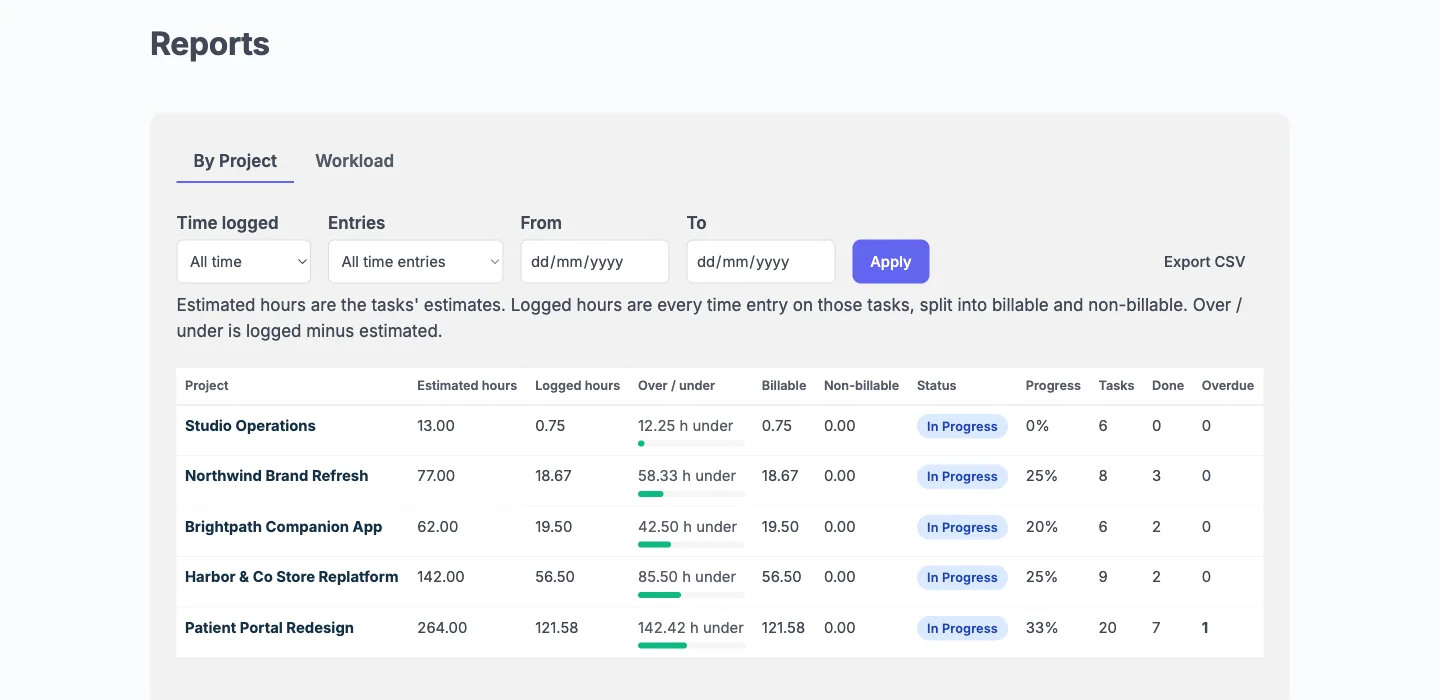
Anything that depends on a native integration with a specific app needs a closer look. Kanbanomy does not claim to match another tool’s integration list. Write down what each integration does for you and check it against the list above before you commit.
What should I check before I switch?
Use this checklist before the import.
- Your WordPress site runs 7.0 or newer on PHP 8.1 to 8.5.
- Your team has accounts on the site, so assignees can be matched.
- You know which board becomes which project, and you have created those projects.
- You exported each board to CSV and opened the file to check the columns.
- You marked which tasks are private to your team, so you can set the Internal flag.
- You wrote down every dashboard and integration your team uses, and chose a replacement or a decision to drop it.
- Your backup covers the full WordPress database and you have tried a restore.
- Your host delivers site email, or you added an SMTP plugin. Invitations and notifications depend on it.
- You know that milestones and time entries do not come across and will be recreated by hand.
What does the first week look like?
Keep the old tool read-only while you test. Nothing here needs a big-bang cutover.
Day 1. Install and activate the plugin. Create one project and import one small board. Read the results and the Values to check list.
Day 2. Fix the mapping and undo the import if needed. Undo removes exactly what the import created and is available for 7 days. Import again.
Day 3. Rebuild milestones by hand, since no import brings them. Set Board columns to match how the team works.
Day 4. Invite two teammates and one friendly client. Look at the Hub as the client, in a private browser window, to confirm Internal tasks are hidden.
Day 5. Connect Slack and set up the two or three automation rules you miss most. Check the Reports screen.
Days 6 and 7. Import the remaining boards, one project at a time. Retire the old workspace for active work when the team stops opening it.
What are the limits?
Honest limits matter more than a long feature list.
- There is no invoicing, deal pipeline or ticketing.
- There is no native mobile app. The interface works in a phone browser.
- Clients cannot request timeline changes.
- There are no bundled translations. The plugin is translation-ready and ships a .pot file.
- Imports skip milestones and time entries.
- There is no direct importer for monday.com, ClickUp, Teamwork or Jira. CSV is the route.
- Import is not a backup. Use a real database backup.
- Email delivery belongs to your site, not the plugin.
- A Board column shows its first 20 cards with the column’s real total, and the Gantt plots up to 200 dated tasks, open work first.
Who should not switch?
Stay where you are if any of these describe you.
- You rely on one specific app integration that has no counterpart in Slack, webhooks or the REST API.
- You need invoicing or a sales pipeline inside the same tool.
- You want someone else to host, patch and back up the system. Kanbanomy is self-hosted, so you own that work.
- Your team needs a native phone app.
- You need clients to propose timeline changes inside the tool.
- You have hundreds of boards with deep history you must preserve exactly. Plan a fresh start and keep the old workspace as an archive.
If you are on the fence, run the demo, then import a single board and see how it feels. The undo window means a bad first try costs you nothing. When you are ready, get Kanbanomy and read the setup guide in the docs.
Who moves from monday.com.
- Teams whose bill grows with every person who needs to look at a board.
- Agencies who want clients to see progress without joining the team workspace.
- Owners who would rather host the project record themselves.
monday.com and Kanbanomy side by side.
| What matters | monday.com | Kanbanomy |
|---|---|---|
| Where the data lives | On monday.com’s servers | In your own WordPress database |
| How you pay as you grow | Per seat, per month | One licence per site, no seat meter |
| Adding a client | Usually a seat, a guest slot or an upgrade | A Client role, as many as you need |
| Keeping internal work from clients | Depends on the plan and how you set it up | Internal tasks and team-only threads are built in |
| If you stop paying | Access ends | Everything keeps working, forever |
What moves across from monday.com.
Boards export to spreadsheets
Export a board to CSV and map it to Kanbanomy task fields, with a preview before anything is created.
Statuses become columns
Map your status column and tasks land in the matching Board column.
Undo for 7 days
If the mapping is off, undo the import and try again.
How to move.
- In monday.com, export the board to a spreadsheet.
- In WordPress, open Kanbanomy, then Import, choose Spreadsheet (CSV) and upload the file.
- Pick the monday.com preset or map the columns yourself, check the preview and start the import.
Check this first.
- There is no API importer for monday.com. CSV is the route, and the CSV importer has a column-mapping preset for monday.com exports.
- Dashboards and integrations you rely on need a replacement. Kanbanomy has Reports, Slack and webhooks.
- Milestones and time entries are not part of any import.
Try it for this topic.
Open the guided demo, a client-services studio with real projects, or launch your own sandbox copy on InstaWP. Here is what to click:
- Open Import in the demo and look at what comes across and what stays behind.
- Open a project and move a card on the Board, then check the Gantt.
- Sign in as the client and compare what they see with what the manager sees.
monday.com to Kanbanomy: questions
Can I invite clients without paying for another seat?
Yes. Kanbanomy has no per-user fee. A client is a Viewer on one project with the Client role, and they see the Overview, Tasks, Gantt, Calendar, Milestones and Discussions tabs of the projects you share. Pricing is per site, not per person.
What happens to my monday.com automations and dashboards?
They do not come across. Kanbanomy has automation rules (a trigger, conditions and an action, up to 20 per project), Reports for portfolio and workload views, Slack, signed webhooks and calendar links. You rebuild what you still need on the Kanbanomy side.
Do I need a developer to run it?
No build step is needed. You download the plugin, install it and activate it like any other WordPress plugin. You do own hosting, backups and email delivery, so budget for those the way you would for any site.
What happens if I stop renewing the licence?
The plugin and every feature keep working. Updates and support stop. Nothing is disabled, and the lifetime options for Personal and Developer mean you may never need to renew at all.
Does Kanbanomy import monday.com boards?
Through a spreadsheet. Export the board to CSV and upload it; the CSV importer has a column-mapping preset for monday.com exports. Tasks keep their title, description, status, priority, dates, assignee and estimated hours.
Does Kanbanomy have visual timelines?
Yes. There is a Gantt timeline with dependency arrows, a calendar and a Board, all showing the same status.
Is there a per-seat fee?
No. Pricing is per site, and a one-time lifetime licence is available for Personal and Developer.
Other comparisons.
Trello alternative, Asana alternative, ClickUp alternative, Teamwork alternative. Or read about the client portal and self-hosted project management.
Try it with your own monday.com board.
Self-hosted project management with no per-user fee, no per-project fee and a one-time licence. Try the demo first, then pick the licence that fits your sites.