
Self-hosted project management without another server.
Most self-hosted tools need their own server, runtime and upgrades. Kanbanomy runs inside the WordPress site you already host.
Self-hosted means the software runs where you put it and the data sits where you keep it. With Kanbanomy that place is your WordPress site. Projects, tasks, comments and time entries live in 25 tables in your own database. There is no separate server to run, no container to patch and no build step. The only outbound request the plugin makes is a licence check that sends your key and site address, never your content.
That choice has a price, and this page states it. You own the hosting, the backups and the uptime. In return you own the data and pay no per-seat fee. Read on to see exactly what that means in practice.
What does self-hosted mean for Kanbanomy?
Three things hold at once.
- Your database holds the data. Kanbanomy creates its own tables, prefixed pflow_, and does not store project data as posts.
- Your server runs the code. It is an ordinary WordPress plugin. It needs no second runtime, no queue service and no extra daemon.
- You decide what leaves. Nothing about your projects goes anywhere unless you switch on a connection yourself, such as Slack, a webhook or the AI assistant.
Many self-hosted tools ask you to run their own application stack next to your site. This one runs inside the stack you already maintain. If your site is up, your project tool is up.
Where is my data stored?
Everything lives in 25 tables created by the plugin. Attachments are different. They are WordPress media library items, kept in a protected folder named kanbanomy-private under your uploads directory, with random file names. Each download goes through a permission check.
That split matters for backups, which the next sections cover. A backup tool that exports only posts and pages will miss every project, task and comment. A tool that copies the whole database and the uploads folder will capture everything.
Time is stored in UTC in version 1.3.0. Times written before the upgrade were converted using the site timezone at upgrade time, so a site that changed its timezone while on an older version keeps those older rows offset by the difference. New rows are correct.
What leaves my server?
By default, one thing. The licence check sends your licence key and site URL to the licensing service, and nothing from your projects.
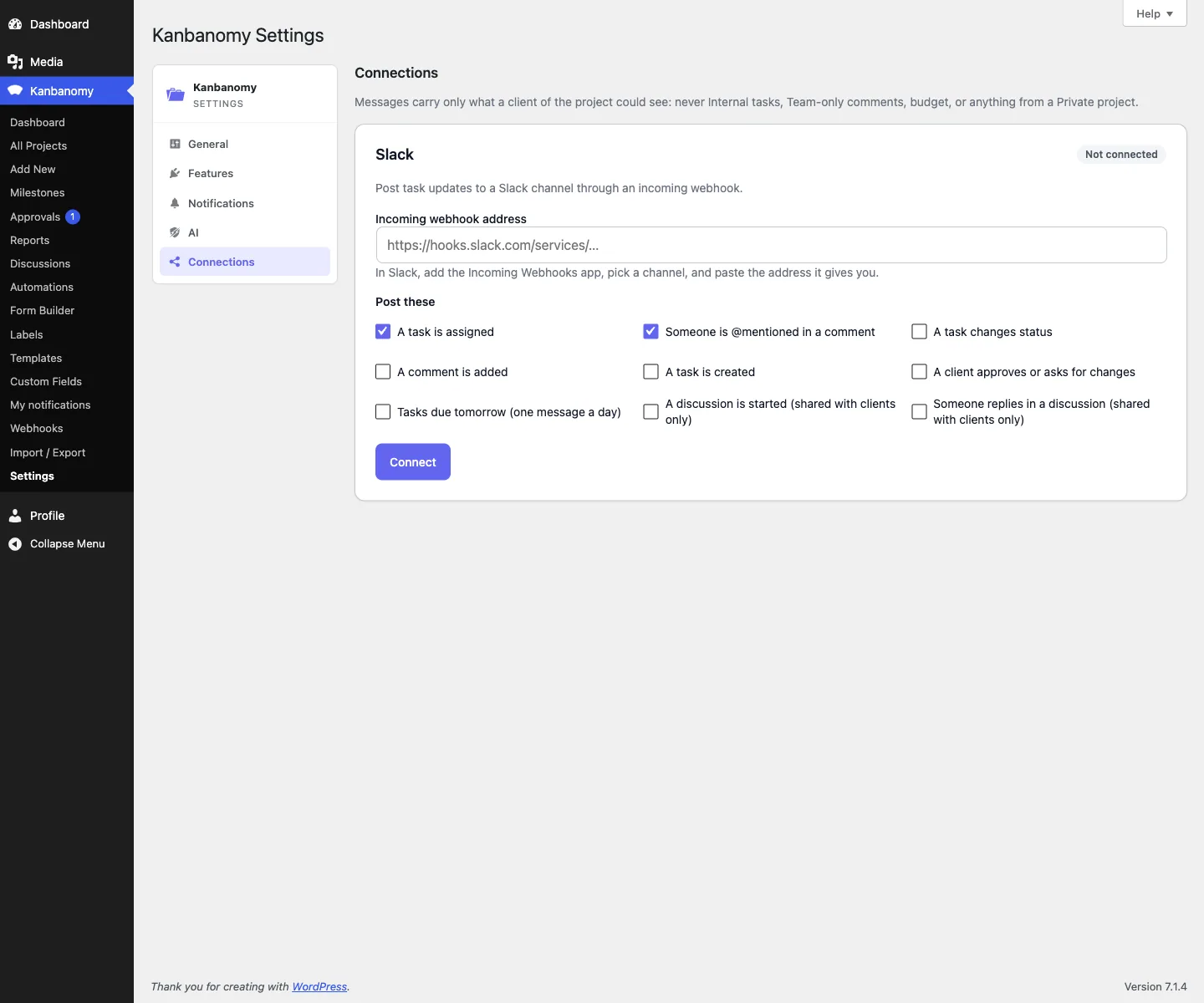
Some features are optional connections, and each one is off until you set it up.
| Connection | What it sends | Where you control it |
|---|---|---|
| Slack | Task updates a client could see, through an incoming webhook | Settings, Connections |
| Signed webhooks | Event data to an https address you provide | Kanbanomy, Webhooks |
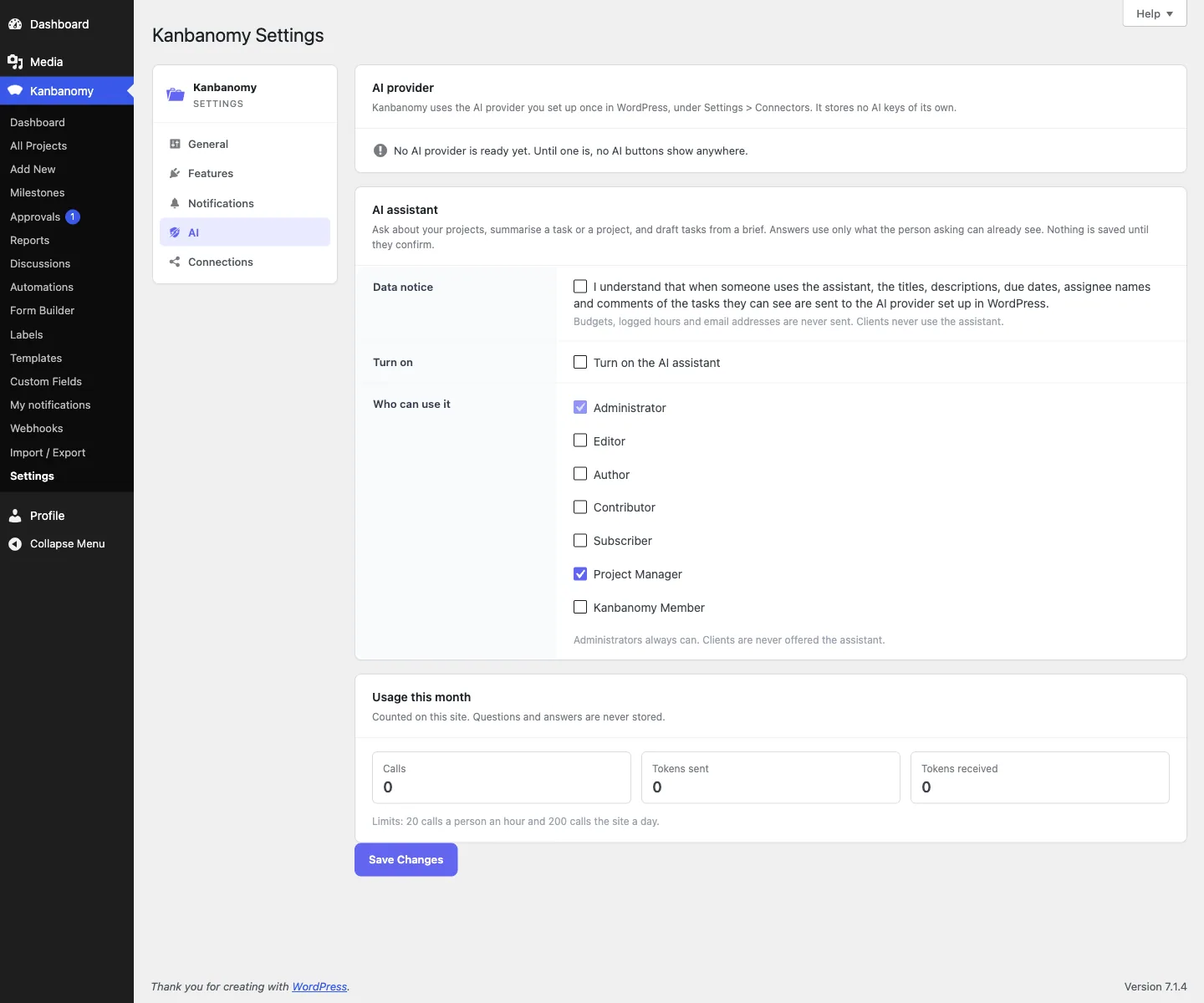
| AI assistant | What the asking person can already see, never budgets | Settings, AI |
| Notifications and invitations, sent through your site’s mail | Settings, Notifications |
Webhooks are your responsibility. If you configure an outbound webhook, you are sending project data to that endpoint, so declare it in your privacy policy. Kanbanomy only accepts public https addresses, and it refuses local, private-network and plain http addresses.
The AI assistant is off by default. It uses the AI provider you set up in WordPress, stores no keys of its own, and needs an administrator to accept a data notice first.
What do you need to run it?
The requirements are small.
| Requirement | Detail |
|---|---|
| WordPress | 7.0 or newer |
| PHP | 8.1 to 8.5 |
| Database | 25 tables created by the plugin |
| Build step | None. Download, install, activate |
| Scheduled jobs | Action Scheduler if present, WP-Cron otherwise |
| Whatever your site can send, so an SMTP plugin is wise |
There is no composer or npm step. Upload the ZIP under Plugins, Add Plugin, Upload Plugin, activate it and walk through the four-screen setup wizard. It takes about five minutes. Then enter your licence key under Settings, License.
The plugin inherits your theme colours and ships dark mode and right-to-left support. It was checked on BuddyX, BuddyX Pro, Reign and Twenty Twenty-Five.
How should you host and back it up?
You own this part, so give it real attention. The site owner handbook is blunt on the point. Import and Export is not a backup system. Export offers four data types and Import accepts two, so exported milestones and time entries cannot be loaded back through the plugin.
A sound plan has four parts.
- Back up the full database. Confirm the job copies every table, not only the core WordPress ones.
- Back up the uploads folder. Attachments are media items and are covered by your normal uploads backup.
- Keep copies off the server. A backup on the same disk fails with the disk.
- Test a restore. An untested backup is a hope.
Here is a restore test you can run once on a staging copy.
- Restore the database and the wp-content uploads directory.
- Confirm the project count, the task count and one project’s Board match production.
- Open a task with an attachment and confirm the file loads.
- Open Tools, Scheduled Actions and confirm the kanbanomy group is still listed.
If you serve the site with nginx, add a deny rule for the kanbanomy-private folder. Apache protection is automatic through a shipped .htaccess file, and nginx does not read that file. Attachments stay protected by the permission check either way, so the rule is extra protection.
Will it hold up at scale?
Kanbanomy 1.3.0 was tested on a seeded site with 10,000 users, 2,007 projects and 100,023 tasks, plus 75,000 comments and 200,000 activity entries. The run used PHP 8.1, MariaDB and a developer laptop with no object cache, with BuddyX Pro, BuddyPress, WooCommerce and LearnDash active.
| Page | Server time |
|---|---|
| Hub for a member of 300 projects | Under 210 ms |
| A project with 5,000 tasks (Overview, Tasks, Board, Gantt) | 80 to 90 ms |
| Projects archive, Calendar and Reports | Under 210 ms |
| Member search across 10,000 users | 82 ms |
Every list pages on the server, so a page costs about the same on a 45-task project as on a 5,000-task one. The search index for all 100,000 tasks finished in the background in about 14 seconds.
Two honest notes. The scale run used WordPress 6.9, which predates the 7.0 minimum. And your hosting decides the absolute numbers. A Board column shows its first 20 cards with the real total, and the Gantt plots up to 200 dated tasks, open work first.
Live updates are cheap as well. On the same test site, one poll cost about 0.12 seconds for the whole request at the median.
How does scheduled work run?
Kanbanomy runs daily jobs. They prune the activity log, clean read notifications, send milestone reminders and create the next occurrence of recurring tasks. It uses Action Scheduler first and falls back to WP-Cron only when Action Scheduler is absent. You can see the jobs under Tools, Scheduled Actions, filtered to the kanbanomy group.
If recurring tasks or reminders stop, check these in order.
- Open Scheduled Actions. Pending actions with a past date mean the queue is stalled.
- Remember that WP-Cron needs traffic. A site with no visitors runs no cron.
- Check wp-config.php. If DISABLE_WP_CRON is true, confirm a real server cron calls wp-cron.php every five minutes.
- Read the error log, because a fatal in one job can block the queue.
Retention defaults are 30 days for read notifications and 90 days for the activity log. Unread notifications are never deleted by cleanup.
The daily digest and milestone reminders use the same queue, so a quiet site can send them a little after the set hour.
How does it handle privacy requests?
Kanbanomy connects to the WordPress personal data tools. Requests run through Tools, Export Personal Data and Tools, Erase Personal Data, keyed on email address. They cover guest form submitters as well as registered users.
An export includes projects, tasks, comments, time entries and submissions. Erasure treats personal and shared records differently, on purpose.
- Memberships, task assignments and notifications are deleted.
- Tasks, comments, activity entries and time entries stay, with the personal link removed.
- Submission records lose the name, email and IP address.
Projects and tasks are never deleted by an erasure request. If a departing person’s work must go too, delete those projects yourself afterwards.
New projects default to members only. They are not served to anonymous visitors and not indexed by search engines.
What happens if you uninstall?
Deactivating is always safe. It hides the interface and stops scheduled jobs, and every table, project and file stays. Reactivating restores everything.
Deleting the plugin depends on one setting, called delete data on uninstall, under Settings, General. It defaults to off.
| Setting | Deleting the plugin |
|---|---|
| Off (default) | All 25 tables and every project, task and time entry are kept |
| On | All 25 tables are dropped, including the search index. Custom roles are removed. It cannot be undone |
There is no confirmation step at deletion time, so the decision is made when you tick the box. Take a database backup and test a restore before you ever turn it on. Attachments are never deleted by uninstall at either setting.
What does a lapsed licence mean?
Almost nothing changes day to day. Every feature works without a licence key, and a lapsed licence keeps working forever. You stop receiving updates and support, and nothing is disabled.
Pricing is per site, with no per-user and no per-project fee.
| Licence | Sites | Yearly | Lifetime |
|---|---|---|---|
| Personal | 1 | $69 a year | $199 once |
| Developer | 5 | $99 a year | $299 once |
| Agency | Unlimited | $399 a year | Not offered |
Pay once if you take a lifetime licence. Every feature is in every licence, and a 30-day refund applies. See the pricing page for current terms.
What do you own and what do you outsource?
This table is the honest version of the trade.
| Area | You own it | You can hand it off |
|---|---|---|
| Project data | In your database | Backup service for the database copy |
| Hosting and uptime | Yes | A managed WordPress host |
| Email delivery | Your site’s mail | An SMTP or mail service |
| Updates | You apply them | Support while the licence is active |
| Backups | Yes, and you test them | A backup plugin or host feature |
| Privacy requests | You run them | Built-in WordPress tools |
The handbook puts it plainly. If you compare Kanbanomy with a hosted tool, the trade is that you own the data and pay no per-seat fee, and in exchange you own the hosting, backups and uptime.
What does it cost to own?
The licence is only part of the cost, so count the rest. The table lists each line.
| Line | Cost with Kanbanomy |
|---|---|
| Per user | $0. Teammates and clients are users of the site you already host |
| Per project | $0. The scale test ran 2,007 projects and 100,023 tasks |
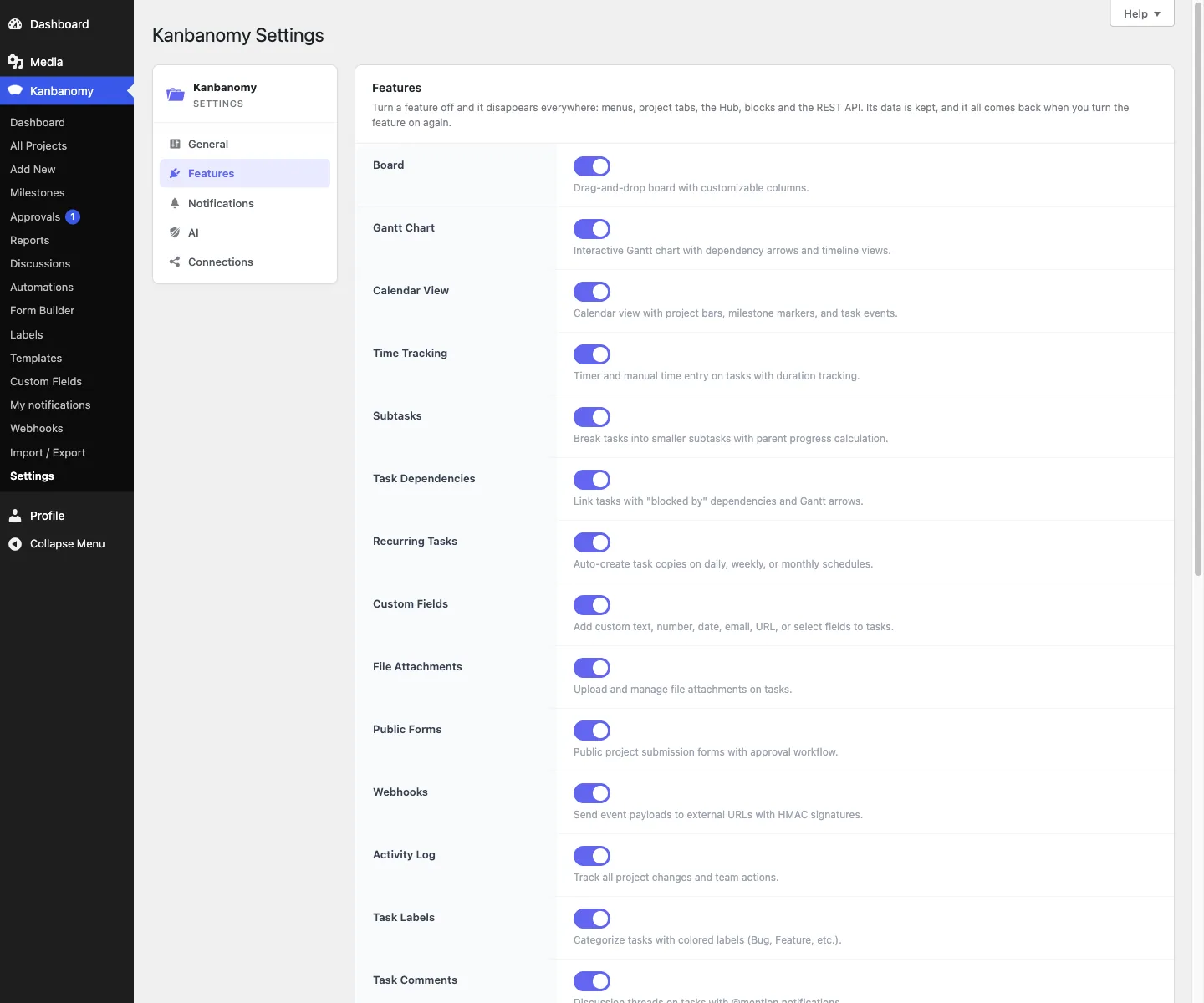
| Per feature | $0. Fifteen features, all in every licence |
| Licence | Once for a lifetime licence, or yearly |
| Hosting | Whatever your WordPress host already costs you |
| An SMTP plugin or mail service, if your host cannot send reliably | |
| Backups | Your backup plugin or host feature, plus the time to test a restore |
The extra work is mostly maintenance you already do for the rest of the site. Plugin updates, a database backup and a restore test are the same habits, applied to one more plugin.
How do you move data in or out?
Moving in is supported. Kanbanomy imports a Trello board from its JSON export and an Asana project from its CSV export. Anything else, including ClickUp, Teamwork, monday.com and Jira, comes in through a spreadsheet. Every import shows a preview first, sends no emails and can be undone for 7 days. No import brings milestones or time entries.
Moving out is a CSV export of projects, tasks, milestones and time entries, written in batches so years of logged time download without running out of memory. You can also send a calendar to any calendar app as an .ics file. Because the data sits in your own database, you can always take a copy of the tables yourself.
Guides are available for moving from Trello, Asana or a CSV file.
Who should choose hosted software instead?
Pick a hosted service if any of these describe you.
- You want a vendor to carry the uptime and the backups.
- No one on your side can restore a database or read an error log.
- You need invoicing, a deal pipeline or ticketing in the same tool.
- Your team lives in a native mobile app.
- You do not run WordPress and do not plan to.
Pick self-hosting if you already run WordPress, you want the data in your own database and you would rather pay once than per seat. A per-seat bill grows with every contractor and client you add, and here that line stays at zero.
You can read the site owner handbook before you buy, and the evaluation guide lists every limit. Then try the demo or get Kanbanomy and test it on a staging site first.
What self-hosted means here.
- Your data stays yours. Projects, tasks, comments and time live in 25 tables in your own database. The only outbound request is the licence check, which sends your key and site address, never your content.
- No separate stack. It needs WordPress 7.0 or newer and PHP 8.1 to 8.5. There is no build step: install and activate.
- You own the hosting, the backups and the uptime. That is the trade for owning the data and paying no per-seat fee, and the evaluation guide says so plainly.
- It keeps working. Every feature works without a licence key, and a lapsed licence keeps working forever.
Self-hosted compared with hosted tools.
| What matters | Hosted project tools, typically | Kanbanomy |
|---|---|---|
| Where your project data lives | On the vendor’s servers | In your own WordPress database |
| What it costs as the team grows | Per user, per month | One licence per site, no seat meter |
| Adding a client | Often another paid seat or a guest allowance | A Client role, as many as you need |
| Keeping internal work private | Depends on the plan | Internal tasks and team-only threads, built in |
| Time tracking and Gantt | Often a higher plan or an add-on | Included in every licence |
| If you stop paying | Access ends | Everything keeps working, forever |
What it costs to own.
- Per user
- $0
- Teammates and clients are users of the site you already host.
- Per project
- $0
- The scale test ran 2,007 projects and 100,023 tasks.
- Per feature
- $0
- Fifteen features, all in every licence. No add-on store.
- Licence
- Once
- A one-time lifetime licence, priced per site. Yearly is also available.
- Your data
- Yours
- Stored in your own database. The only outbound call is the licence check.
Self-hosting questions
Is there a per-user or per-project fee?
No. Kanbanomy runs on your own WordPress site, so your team and your clients are users of a site you already host. Add as many people, clients and projects as you like. The licence is priced per site, and a one-time lifetime licence is available.
Is it self-hosted project management software?
Yes. It runs on your own WordPress and stores everything in your own database, so there is no separate server to run and no per-seat fee. The only outbound request is the licence check.
What happens if I stop paying?
Nothing breaks. Every feature works without a licence key, and a lapsed licence keeps working forever. You stop receiving updates and support. Deleting the plugin also keeps your data unless you opt in to destroying it.
What do I need to run it?
WordPress 7.0 or newer and PHP 8.1 to 8.5. There is no build step: install and activate. It creates 25 database tables, so confirm your backup covers the whole database. Scheduled work uses Action Scheduler when present, and WP-Cron otherwise.
Will it slow my site down?
It was tested with 10,000 users, 2,007 projects and 100,023 tasks. Lists page on the server, so a 5,000-task project costs about the same as a 45-task one. Its scripts and styles load only on pages that use it.
How does it handle personal data?
It connects to the privacy tools already in WordPress, so data export and erasure requests run through Tools, Export Personal Data and Erase Personal Data.
Own your project data.
Self-hosted project management with no per-user fee, no per-project fee and a one-time licence. Try the demo first, then pick the licence that fits your sites.