
An Asana alternative with no per-seat bill.
Run projects, deadlines and client approvals inside the WordPress site you already host. Pay once per site, not once per person.
Kanbanomy is an Asana alternative that lives inside your own WordPress site. It plans work the way a deadline-driven team does, with sections, due dates, subtasks, dependencies and a timeline, and it adds time tracking and a client portal. You pay per site, with no per-user fee and no per-project fee, and a lifetime licence is available for Personal and Developer.
To move, export an Asana project as CSV, upload it to Kanbanomy and check the preview. Sections become Board columns, tasks and one level of subtasks come across, and completed tasks arrive as Done. Comments and files stay behind. This page covers how planning works after the move and where a team workspace differs from a client-facing project view.
Why do teams look for an Asana alternative?
The reasons are usually structural. They have little to do with missing features.
The first is the bill. Hosted work-management tools usually charge by person. That works while the team is stable. It gets awkward when a studio adds contractors for one project, or when each client wants to see progress. Check the tool’s current pricing page for how it counts people today, then ask who on your list only needs to look.
The second is where the record lives. A hosted workspace holds your project history on the vendor’s servers. If you stop paying, access ends. Some owners are fine with that, and others want the record in their own database next to the rest of their site.
The third is audience. A team workspace is built for the team. Clients are a different audience, and showing them progress usually means building a second set of projects, a report or a weekly email. Teams that do this every Friday are the ones who tend to look for a different tool.
None of these reasons says Asana is a poor product. They describe who gets more from a self-hosted tool with a flat licence.
How do Asana sections and subtasks map to Kanbanomy?
Asana projects are organised by sections, and tasks can have subtasks. Kanbanomy has an equivalent for each.
| In Asana | In Kanbanomy |
|---|---|
| Section | Board column in a new project |
| Task | Task with notes, dates and assignee |
| Subtask (one level) | Subtask on the task |
| Tag | Label |
| Assignee | Assignee, matched to a site user |
| Priority | Priority |
| Start and due dates | Start and due dates |
| Completed At date | Task in the Done column |
The import reads the sections in the order they appear and creates a Board column for each. If your sections describe stages, such as Backlog, Doing and Review, the board reads naturally. If your sections describe topics, such as Design, Content and Launch, you may prefer to reorganise after the import. Columns are yours to rename, reorder, add or remove per project.
Kanbanomy reads the words other tools export, ignoring capitals and extra spaces. A status such as Backlog, Not started, Doing, Working on it, Blocked or Complete is recognised. A priority such as Urgent or Highest becomes Critical, and Normal becomes Medium. If a value cannot be read, the task is still imported and the value is listed under Values to check with what Kanbanomy used instead.
What does the Asana CSV import bring across, and what stays behind?
Here is the short version, with the limits stated plainly.
Comes across
- Sections as Board columns.
- Tasks with notes, start and due dates, assignee and priority.
- Tags as labels.
- One level of subtasks.
- People matched to site users by email, then username, then name.
Stays behind
- Comments and files, because Asana’s CSV does not include them.
- Custom fields.
- Milestones and time entries, because no import in Kanbanomy brings them.
- Anything an unmatched person was assigned to stays, but the task is left unassigned and the person is listed.
The upload limit for an Asana CSV is 20 MB. The file needs Asana’s Name and Section/Column columns, and Kanbanomy tells you if they are missing.
The missing comments are the one loss that deserves a decision. If your old comments hold decisions you may need later, keep the Asana project as a read-only archive for a while. Cancelling the plan on the day you import is the mistake to avoid.
How does the move from Asana work, step by step?
A single project takes a few minutes. The preparation is the longer part.
- Install and activate Kanbanomy. There is no build step. Download, install, activate.
- Add your team to the site. Each person who has tasks in Asana needs a WordPress user so the import can match them.
- Export from Asana. Open the project, use the project menu, then Export or Print, then CSV.
- Upload. In WordPress go to Kanbanomy, then Import / Export, then Import. Choose Asana project, pick the file and click Upload and preview.
- Read the preview. It lists tasks, subtasks, columns, labels and people, and counts what it will leave out. Under People, change any match or clear it.
- Start the import. It runs in the background with a progress bar, and nobody gets an email while it runs.
- Read the results. Check what was created, who was not matched and any values to check. Then open the project.
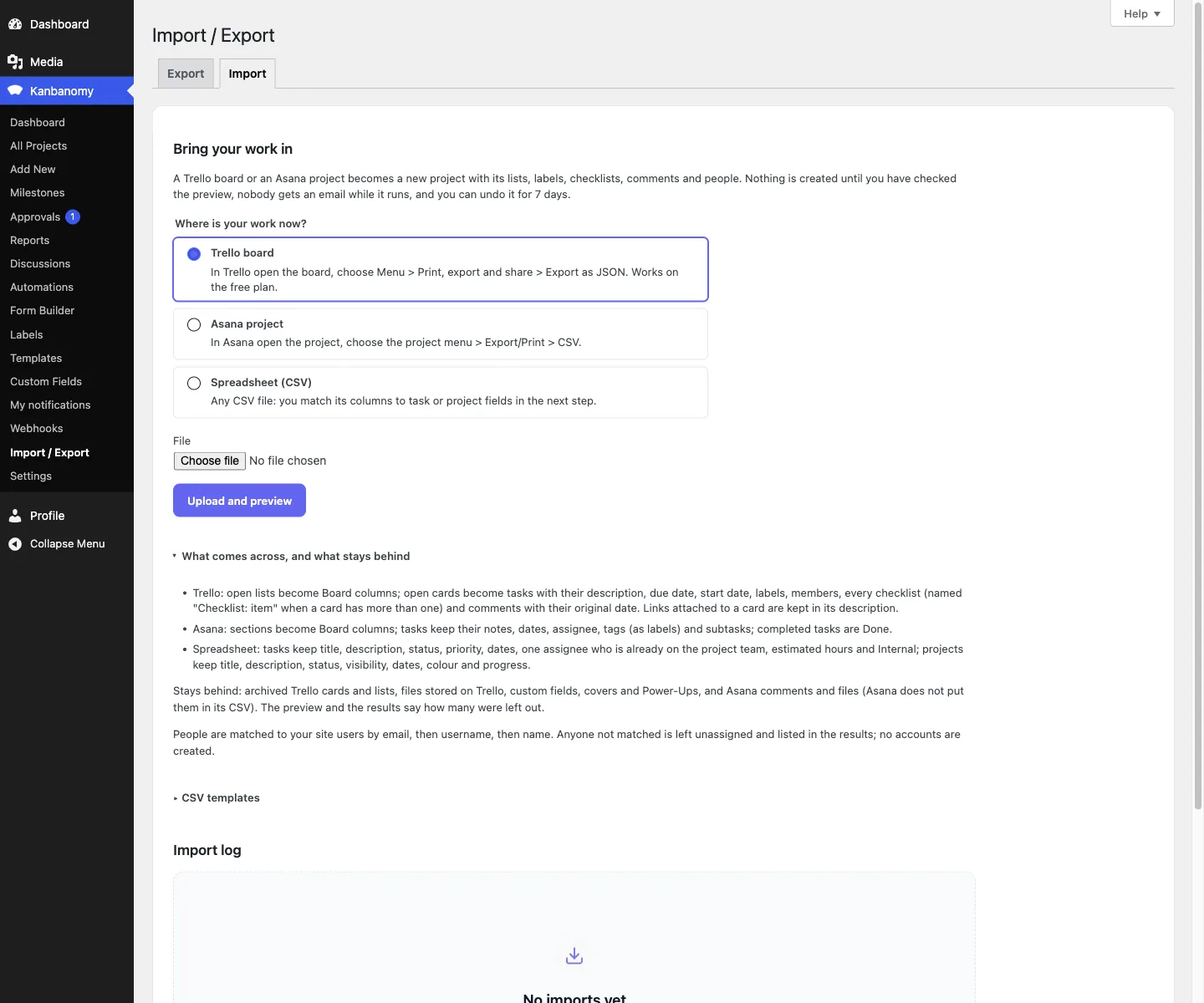
To reverse it, open the import in the Import log, type UNDO and confirm. That removes the tasks, comments, columns, labels and team members that import created. Anything you added by hand stays, and so does the project if it holds other work.
How do you plan work with deadlines and dependencies?
This is where deadline-driven teams will spend their time. Kanbanomy shows the same tasks in four ways, and the Gantt is the one for planning.
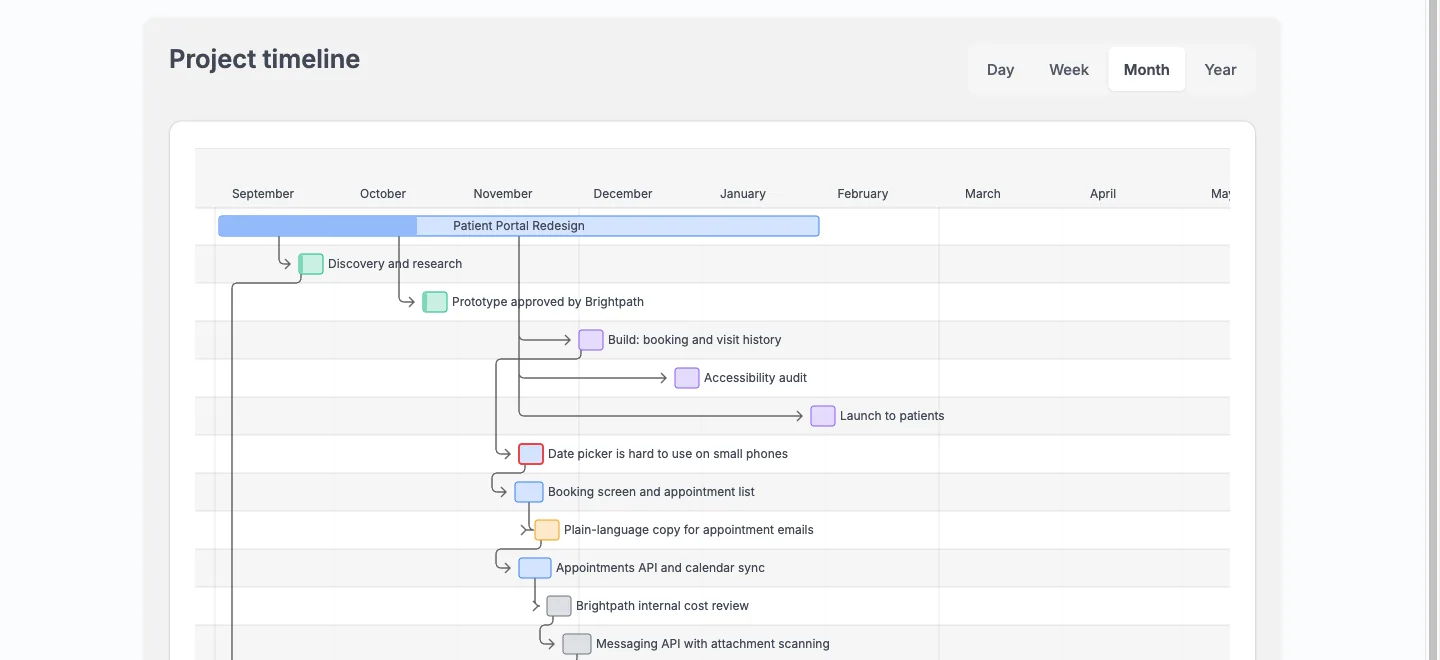
The Gantt shows projects, milestones and tasks as bars, with arrows between tasks that depend on each other. You can switch between Day, Week, Month and Year. A manager can drag a bar to reschedule it. The chart plots up to 200 dated tasks, with open work first. Hover a bar to see its details.
A planning pass after the import goes like this.
- Check that every task that drives the schedule has a start and due date.
- Add dependencies where one task waits on another, so a slip shows up on the chart.
- Create milestones for the dates that matter, such as a review or a launch. Milestones are not imported, so you add them by hand.
- Use the calendar to check the month. Project bars, milestone markers and task due dates are colour-coded by project, and you can export the calendar as an .ics file for Outlook, Google Calendar or Apple Calendar.
- Save the task list filters you use every morning as a view, so one click brings back My open work or Overdue.
Tasks also carry checklists, several assignees, comments with @mentions and recurrence. Reports give a portfolio overview, a per-project rollup and per-member workload, with completion rates and overdue counts, and you can export projects, tasks, milestones and time to CSV.
How is a team workspace different from a client-facing project view?
In a team workspace, everyone in it is a collaborator. They see the work and the conversation around it, and the permission model is about what they can edit.
Client work needs a different question. What may this person see at all? Kanbanomy answers it with a role and a flag. A client has the Client role and is added to a project as a Viewer. A task marked Internal is hidden from clients everywhere.
A client who opens the Hub sees their projects with status, progress, dates and open and late counts, plus the next milestone. Inside a project they get Overview, Tasks, Gantt, Calendar, Milestones and Discussions. They can comment and answer approval requests. They do not see the board, the activity log, the team list, watchers or logged time. Team-only comments and discussions stay hidden too.
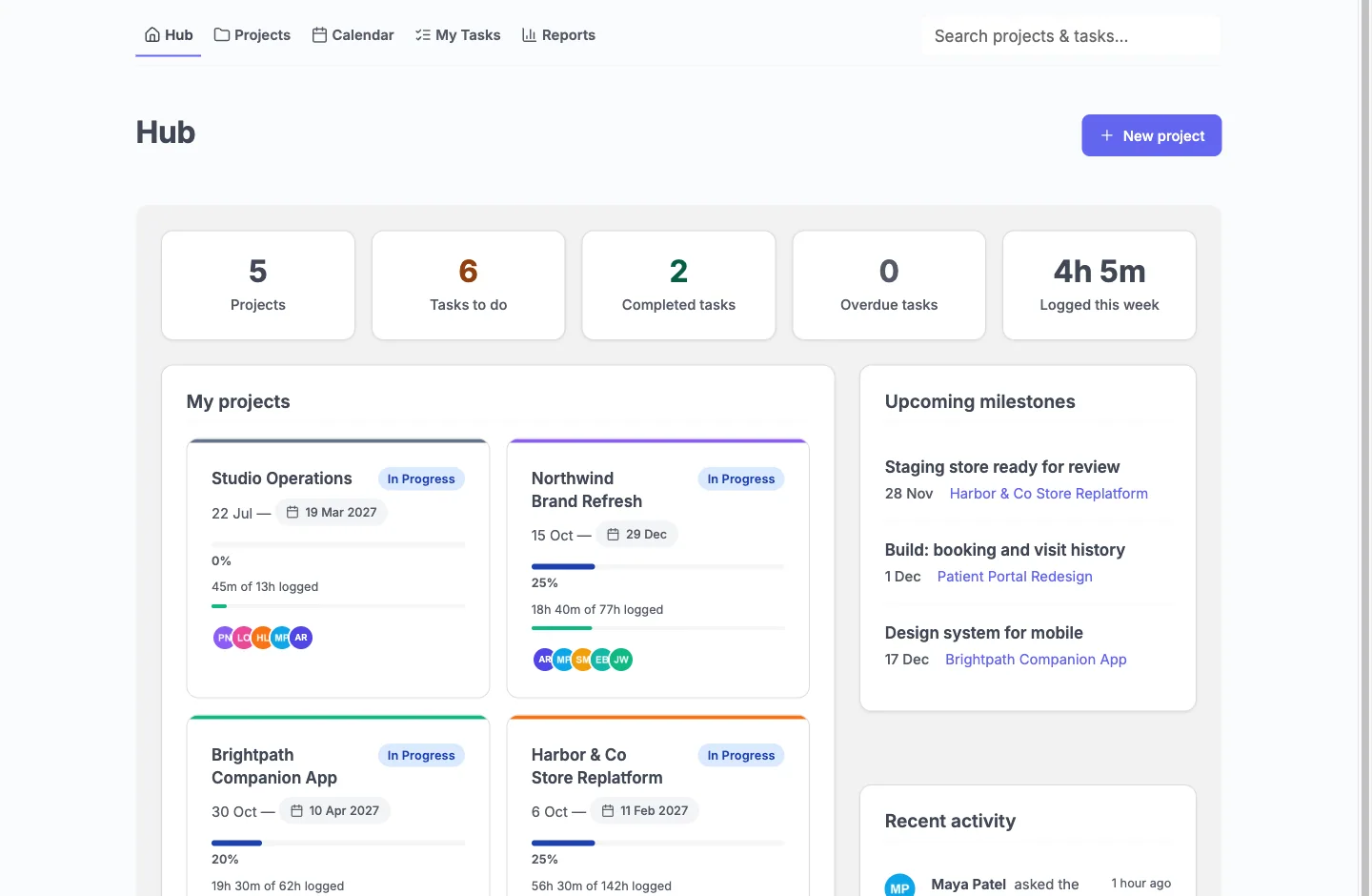
That view is the same project you work in, with the internal parts removed. You do not maintain a second copy. The budget stays hidden from clients unless you tick Client can see: Budget on a project.
One limit matters if you plan around timelines. A client can comment and approve, but cannot request a timeline change. That feature is not reachable in version 1.3.0.
What does it cost to run Kanbanomy instead of Asana?
The licence is per site, every feature is in every licence, and there is no per-user fee or per-project fee.
| Licence | Yearly | Pay once | Sites |
|---|---|---|---|
| Personal | $69 | $199 | 1 |
| Developer | $99 | $299 | 5 |
| Agency | $399 | Not offered | Unlimited |
Lifetime is available for Personal and Developer. Agency is yearly. There is a 30 day refund. If you stop renewing, the plugin and all its features keep working, and updates and support stop.
Compare that to your current Asana bill on Asana’s own pricing page, since plans change. Then add the cost you already carry for WordPress hosting, a mail plugin and backups. Kanbanomy has been tested with 10,000 users, 2,007 projects and 100,023 tasks.
Where does the data live after you move?
In your own WordPress database, in 25 tables the plugin creates. Project data is not sent anywhere. The plugin’s only outbound request is the licence check, which sends your key and site URL and never content.
Because the plugin stores its data in its own tables, a backup that only covers posts and pages will miss it. Confirm your backup covers the full database, and test a restore on staging once. Import and Export is a data-transfer tool, not a backup, and Import accepts projects and tasks only.
Attachments are WordPress media library items and sit in your uploads folder. Deleting the plugin keeps your data by default.
What should you check before you move from Asana?
- Count your projects. Decide which are live, which are archives and which stay in Asana.
- Export a pilot. Pick one live project and export its CSV first.
- Read the CSV. Open it and confirm the Name and Section/Column columns are there.
- Add users. Make sure everyone with tasks is a WordPress user, and add clients with the Client role.
- Decide on Internal. List tasks the client must never see.
- Test mail. Send a test email from the site, and use an SMTP plugin in production.
- Check cron. Recurring tasks and milestone reminders need scheduled jobs to run.
- Archive comments. Decide how long the Asana project stays readable.
- Check backups. Make sure a full database backup exists.
Where does Asana still win?
Asana is hosted, so there is nothing to install, patch or back up. If your team wants a tool running today with no WordPress site, Asana is quicker to start.
Asana has a native mobile app. Kanbanomy does not. Its interface is responsive and works in a phone browser, which suits a quick look and a status change, but not a team that lives in an app.
If you use Asana for work that has nothing to do with projects and clients, such as company-wide goal tracking or cross-team intake across dozens of departments, Kanbanomy will feel narrow. It manages projects. It has intake forms with an approval queue, up to 20 automation rules per project and Slack, webhooks and BuddyPress groups, but it has no invoicing, no deal pipeline and no ticketing.
Who should not switch from Asana?
Stay where you are if you recognise your situation here.
- You have no WordPress site and no wish to run one.
- Your team is large, internal and does not work with clients.
- Your work depends on features Kanbanomy does not have, and you cannot rebuild them with its rules, forms and webhooks.
- You need a native mobile app.
- You need clients to request timeline changes.
- You need invoicing in the same tool.
Kanbanomy suits studios, agencies and in-house teams that already run WordPress, plan against deadlines and show clients progress.
What should you do in the first week after moving?
- Day one. Open the imported project and go through each column. Fix tasks that landed in the wrong place, rename columns and add the milestones that did not come across.
- Day two. Add dates and dependencies, then open the Gantt and read it for the next four weeks. Move anything that does not look realistic.
- Day three. Mark internal tasks, add one client with the Viewer role and log in as that client in a private window to check what they see.
- Day four. Set up the task list filters you use every morning and save them as views.
- Day five. Turn on the features you want, and switch off the ones you do not. There are 15 feature toggles, and they are configuration, not upsells.
Leave the Asana project readable for a month so nobody has to rely on memory. Then move the next one. The Kanbanomy docs have the full import guide, and the Asana migration page walks through the same path.
Who moves from Asana.
- Studios where the bill follows headcount and every new client or contractor needs a decision about seats.
- Teams who want client-facing project views without building a second workspace for clients.
- Owners who want the project record in their own database, not behind a subscription.
Asana and Kanbanomy side by side.
| What matters | Asana | Kanbanomy |
|---|---|---|
| Where the data lives | On Asana’s servers | In your own WordPress database |
| How you pay as you grow | Per user, per month | One licence per site, no seat meter |
| Adding a client | Usually a seat, a guest slot or an upgrade | A Client role, as many as you need |
| Keeping internal work from clients | Depends on the plan and how you set it up | Internal tasks and team-only threads are built in |
| If you stop paying | Access ends | Everything keeps working, forever |
What moves across from Asana.
Sections become columns
Asana sections become Board columns in a new project, and completed tasks arrive as Done.
Tasks keep their detail
Notes, dates, assignee, tags (as labels), priority and one level of subtasks come across.
Preview, then commit
You see what will be created first, nobody is emailed during the import, and it can be undone for 7 days.
How to move.
- In Asana, open the project, use the project menu, then Export or Print, then CSV.
- In WordPress, open Kanbanomy, then Import, choose Asana project and upload the file.
- Check the preview, match people to your site users, and start the import.
Check this first.
- Asana’s CSV has no comments or files, so those stay behind.
- Milestones and time entries are not part of any import.
- People are matched to existing site users, so add your team to the site before you import.
Try it for this topic.
Open the guided demo, a client-services studio with real projects, or launch your own sandbox copy on InstaWP. Here is what to click:
- Open Import in the demo and look at what comes across and what stays behind.
- Open a project and move a card on the Board, then check the Gantt.
- Sign in as the client and compare what they see with what the manager sees.
Asana to Kanbanomy: questions
Can I import several Asana projects at once?
Each import takes one Asana project CSV and creates one new Kanbanomy project from it. Repeat the steps for each project. You preview every file before anything is created, and each import can be undone for 7 days.
What happens to subtasks nested more than one level deep?
The import brings one level of subtasks. Kanbanomy has subtasks on tasks, so you can nest further by hand after the import. Check the preview to see how many subtasks were found before you commit.
Does Kanbanomy have recurring tasks?
Yes. A task can repeat daily, weekly, biweekly, monthly or quarterly. Recurring tasks depend on scheduled jobs, so a low-traffic site needs a real system cron. Asana recurrence settings do not come across in the CSV.
How do I keep Asana comments after the move?
Asana's CSV export has no comments or files, so they cannot be imported. Keep the Asana project as a read-only archive, and copy any comment that still matters into the new task by hand.
Can I import an Asana project into Kanbanomy?
Yes. Export the project as CSV from Asana and upload it. Sections, tasks, one level of subtasks, tags, assignees, priority and dates come across after a preview.
Does it replace Asana for client work?
For project work with clients, yes: boards, Gantt, a calendar, time tracking, approvals and a client portal. It does not do invoicing or a deal pipeline.
Where is the data stored?
In your own WordPress database, in 25 tables the plugin creates. The only outbound request is the licence check.
Other comparisons.
Trello alternative, ClickUp alternative, Teamwork alternative, Monday alternative. Or read about the client portal and self-hosted project management.
Try it with your own Asana board.
Self-hosted project management with no per-user fee, no per-project fee and a one-time licence. Try the demo first, then pick the licence that fits your sites.